
For studios · Insights
The Payouts report
A list of every payout to your bank, with what is inside each one, for any date range. Download it for your bookkeeper.
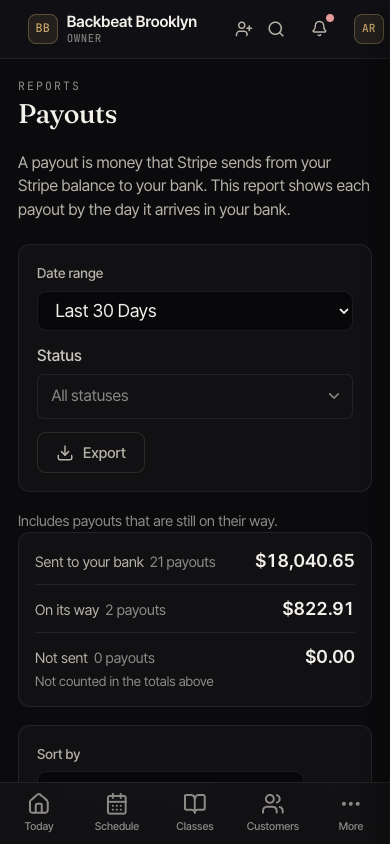
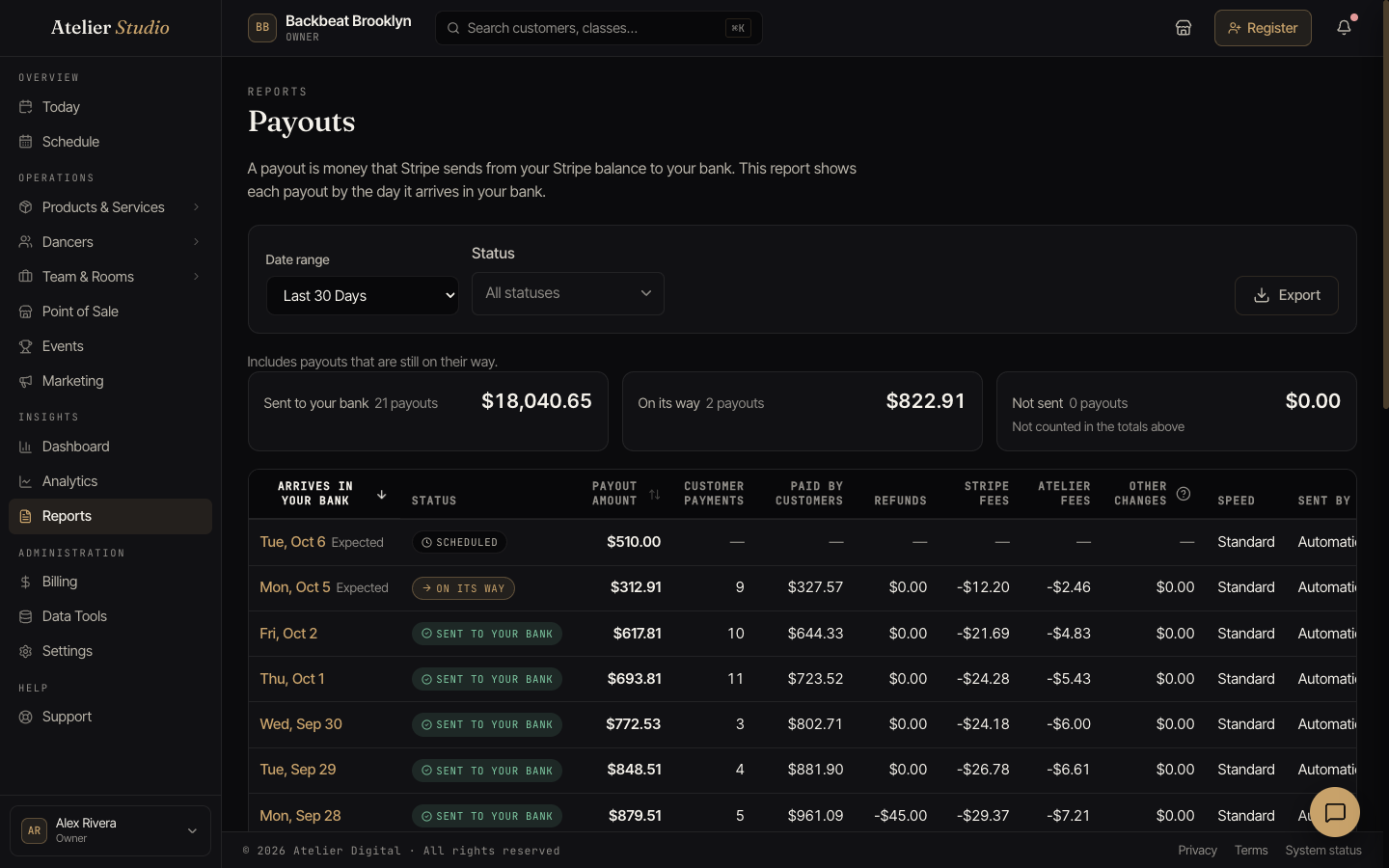
A payout is money that Stripe sends from your Stripe balance to your bank. The Payouts report shows each payout by the day it arrives in your bank. For each payout it also shows what is inside: customer payments, refunds, fees, and other changes. The numbers add up to the payout amount, so you can match them to your bank statement.
Open the report
Open Insights → Reports and choose Payouts. You need permission to see reports. If you can only see billing, use the Payouts tab instead.
Choose the dates at the top. You can pick a ready-made period or your own dates. A custom range can be up to 366 days. The report also includes payouts that are still on their way when the range ends today.
Your next payout
Above the table, the Next payout card shows the money that Stripe will send to your bank next. It shows the amount and the day it should arrive. Under that, it lists the payments that are in this payout, with the customer and what they bought when we can tell.
- If Stripe has already created the payout, the amount is final.
- If Stripe has not created it yet, the card says This is an estimate. Stripe decides the final amount when it creates the payout, so the amount can change.
- Some payouts have no list of payments, for example a payout that you send yourself. The card tells you why instead of showing an empty list.
Select See full payout to open the payout. Select See your payout schedule and Stripe balance to go to Billing → Payouts. See Your payouts.
If you are the studio owner, or staff who manage studio billing, you also see the See this in Stripe button. It opens your Stripe dashboard. Other staff see a short note that says who can open Stripe.
Select Why is there a wait? to read why money takes time to reach your bank. The answer is in Why is there a wait?.
The totals
At the top you see three totals for the payouts you chose:
- Sent to your bank. Payouts that have arrived or are on the way.
- On its way. Payouts that Stripe has started but not finished.
- Not sent. Payouts that did not work. They are not counted in the other totals.
If your studio uses more than one currency, choose the currency first. Each currency has its own totals.
The columns
| Column | What it shows |
|---|---|
| Arrives in your bank | The day the payout reaches your bank. |
| Started on | The day Stripe started the payout. |
| Status | Scheduled, On its way, Sent to your bank, Not sent, or Canceled. |
| Payout amount | The money that went to your bank. |
| Customer payments | How many customer payments are inside the payout. |
| Paid by customers | The full amount your customers paid. |
| Refunds | Money you returned to customers. |
| Stripe fees | Fees that Stripe charges. |
| Atelier fees | Fees that Atelier Digital charges. |
| Other changes | Money added or taken away for other reasons. A disputed payment is also here. |
| Speed | Standard or instant. |
| Sent by | Automatic, or your studio. |
| Bank account or card | Where the money went. |
| Stripe reference | The payout reference. Copy it if you need to ask Stripe about a payout. |
| Reason not sent | Only for payouts that did not work. |
On a phone, each payout is a card. Select Show details to see the breakdown.
When a breakdown is missing
Some payouts have no list of items, and the report says so instead of showing zero:
- Payouts that you sent yourself, and instant payouts. Stripe does not list the items in them.
- Scheduled payouts. Stripe adds the list when it starts the payout.
- Payouts that are still loading. The report gets the items from Stripe in the background. A note under the table says how many are still loading. Select Check again after a moment.
The breakdown totals do not include payouts that have no list of items. A note under the table says how many were left out.
Download
Select Export to download the report as a spreadsheet (CSV or Excel) or a PDF. It has the same columns, a totals row, and the same notes about missing breakdowns.